


QAI/QAB? Request EduBridge + CBET Master Onboarding
ASSESSMENT REGISTRATION + ePORTFOLIO
Register for Nov/Dec Assessment. Build Your ePortfolio. Be Assessment Ready.
If your institution has activated your workspace, use EduBridge to find your profile, register approved Units of Competency, view registered units and upload your Portfolio of Evidence - all in one place.
For TVET CDACC-assessed programmes and QAB-assessed programmes powered by CBET Master.
TVET CDACC Nov/Dec 2026 deadline extended to 24 Oct 2026.
Other candidates will see their applicable assessment series and deadline after login.
Start / Continue Registration
Already Activated?
Login

New candidate?
Activate your profile after your institution activates your workspace.

Returning candidate?
Use the same button to register units, view registered units and upload PoE.
310+
Institutions Onboard
230,000+
Trainees Synced
TVET CDACC
Only integrated with
Integrated with
12+
National Polytechnic QAB MoUs
National Polytechnics QAB MoUs
Get My Institution Ready
-
 Find
Profile
Find
Profile
-
 Register
Units
Register
Units
-
 Build
ePortfolio
Build
ePortfolio
-
 Review &
Approval
Review &
Approval
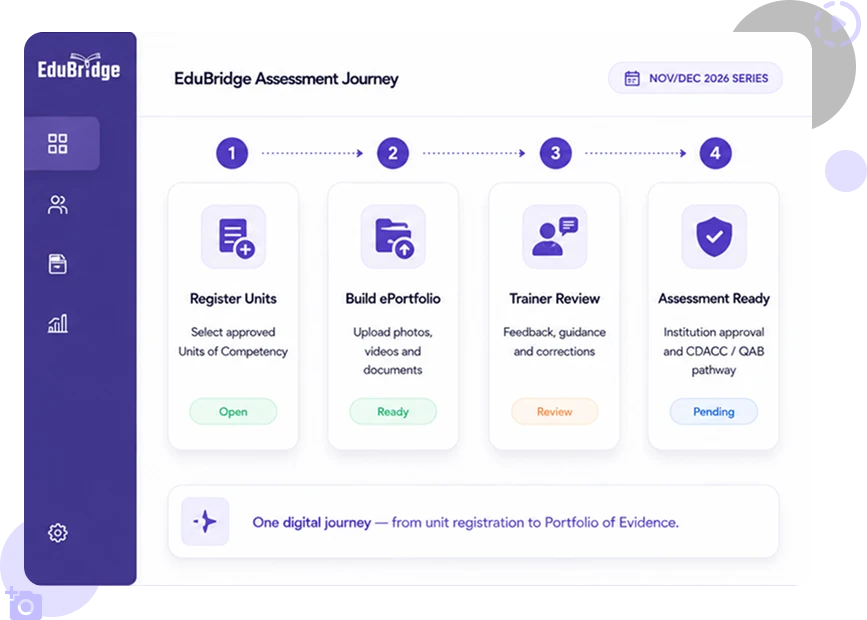
Your Assessment Journey
One digital journey - from profile activation to assessment readiness.
 Register
Unit
Register
Unit

 Build
ePortfolio
Build
ePortfolio
 Trainer
Review
Trainer
Review
 Assessment
Ready
Assessment
Ready

Your PoE Should Not Be Trapped in Box Files.
Many trainees still keep PoE evidence in box files, phone folders, WhatsApp chats, Google Drive folders and printed papers.
-
 Box files get damaged, misplaced or lost.
-
 Phone photos and videos disappear when needed most.
-
 WhatsApp evidence gets buried in old chats.
-
 Trainers struggle to review scattered evidence early.
-
 Trainees may discover gaps too late.
-
 Institutions struggle to track who is assessment-ready.
EduBridge Keeps Your PoE Safe, Reviewed and Ready
EduBridge helps trainees move from scattered evidence to one clear digital PoE workflow. Upload your photos, videos and documents early, get trainer feedback, correct gaps in time and stay ready before assessment pressure begins.


Upload Evidence Early
Trainees upload photos, videos, documents and project evidence from a phone or computer.

Get Trainer Feedback
Trainers review submissions digitally, give comments and guide trainees before it is too late.

Correct Gaps in Time
Trainees can fix missing, weak or incorrect evidence before assessment pressure starts.

Stay Assessment-Ready
Institutions can track PoE progress and support CDACC-assessed PoE workflows.
Upload early. Get reviewed early. Stay ready.
Why Trainees and Institutions Trust EduBridge

Built by ABNO
EduBridge is an ABNO Softwares platform, backed by years of experience building education technology systems across Kenya.

Trusted in TVET
ABNO systems support universities, National Polytechnics, TVCs, TTIs, teacher colleges and private training institutions.

Integrated with TVET CDACC Portal
EduBridge is integrated with TVET CDACC Portal for CDACC-assessed PoEs.

Secure and Scalable
EduBridge is built to support large trainee numbers, trainer review, institution tracking and secure digital PoE management.
Integrated with TVET CDACC Portal
EduBridge is integrated with the TVET CDACC Portal for CDACC-assessed PoEs.
This means institutions can use EduBridge to manage digital PoE upload, trainer review, readiness tracking and submission through the approved CDACC workflow.
What This Means for Institutions
-
Approved Workflow for CDACC-Assessed PoEsPoEs for CDACC-assessed programmes can be submitted through the approved TVET CDACC Portal workflow.
-
Easier Trainer ReviewTrainers can review submitted evidence early, give feedback and help trainees correct gaps before assessment pressure starts.
-
Better Institutional ReadinessInstitutions can track PoE progress and identify trainees who need support before assessment timelines become urgent.
-
Less Manual PressureEduBridge reduces reliance on box files, scattered WhatsApp evidence, printed documents and last-minute manual compilation.
-
Built by the Team Behind the CBA PortalABNO Softwares is behind the development and ongoing maintenance of the TVET CDACC Portal, giving EduBridge strong practical understanding of CDACC assessment workflows.
EduBridge helps institutions move from scattered PoE evidence to a structured digital workflow connected to the TVET CDACC Portal for CDACC-assessed PoEs.
Beyond PoE: Digital Logbooks for Attachment and Teaching Practice
EduBridge can also help trainees record practical learning beyond the classroom, including industry attachment and teaching practice.
Instead of carrying manual logbooks and chasing signatures, trainees can keep activity records digitally and receive supervisor feedback where enabled by the institution.
Digital Logbooks
Trainees record daily activities, progress and reflections from a phone or computer.
Supervisor Feedback
Supervisors can review, comment and approve entries digitally where the institution has enabled the workflow.
Attendance and Activity Records
Institutions can keep clearer records of participation, progress and practical exposure.
Trainer and Institution Visibility
Trainers and departments can monitor trainee progress and identify missing records early.
Career Evidence
Trainees can keep practical work records that may support future career opportunities.
EduBridge is not only for uploading PoE files. It helps trainees build a practical digital
record of their skills over time.
How EduBridge Works?
EduBridge makes it simple to move from scattered PoE evidence to a clear digital workflow.

1

Activate Your Account
Create your EduBridge account, choose your plan and link your profile to your institution or programme.
2

Upload Your PoE
Upload photos, videos, documents and project evidence from your phone or computer.
3

Get Trainer Feedback
Your trainer reviews your evidence digitally, gives comments and guides you early.
4

Correct and Stay Ready
Fix gaps before assessment pressure starts and keep your PoE ready for review and submission.
Upload early. Get reviewed early. Correct early. Stay ready.
Institutions Pay KES 0 for Standard ePOE Access
When trainees subscribe individually, institutions get standard EduBridge ePOE access for PoE management, trainer review and readiness tracking under the trainee-paid model.
Integrated with TVET CDACC Portal for CDACC-assessed PoEs
Support Trainees Without a Heavy Platform Cost
EduBridge helps institutions manage digital PoEs, support trainer review and track assessment readiness under the trainee-paid model.
Standard institution ePOE access is available at KES 0 when trainees subscribe individually.
What Your Institution Gets
- Institution Dashboard – Manage trainee PoEs, programmes and readiness progress in one place.
- Trainer and Assessor Access – Trainers can review submitted evidence, give feedback and guide trainees before assessment pressure starts.
- PoE Readiness Tracking – Identify trainees with missing, weak or incomplete PoEs early enough for correction.
- TVET CDACC Portal Integration – EduBridge is integrated with TVET CDACC Portal for CDACC-assessed PoEs.
- Reports and Monitoring – Track trainee progress, trainer review status and institutional readiness.
- Trainee Activation Support – EduBridge supports onboarding, activation materials and guidance to help trainees subscribe and start uploading.
No heavy platform acquisition cost. No manual PoE chaos. No last-minute assessment
pressure.
Trainee subscription fees are paid directly by trainees unless the institution requests a
sponsored arrangement.
Frequently Asked Questions
EduBridge connects assessment registration, practical evidence, trainer feedback and progress tracking. Trainees build a record of their skills, while institutions and Qualification Awarding Bodies (QABs) manage reviews and monitor assessment readiness. Available workflows depend on your institution and assessment pathway.
EduBridge is developed and operated by ABNO Softwares International Ltd. It integrates with the TVET CDACC Portal and connects participating QABs through CBET Master. The relevant awarding body retains authority over assessment decisions, results and certification.
No. EduBridge can work alongside your existing system. Candidate records can be connected through supported integrations or uploaded through agreed processes. Our team confirms the appropriate setup during onboarding.
Core institutional ePortfolio access costs KES 0 under the trainee subscription model. Eligible QABs can also receive CBET Master at no licence cost under an agreement requiring exclusive use of EduBridge for electronic PoE. Optional modules, additional storage and communication services are priced separately where applicable.
Profile activation, assessment registration, registered-unit verification and applicable status viewing are free on EduBridge. Paid plans cover personal Portfolio of Evidence (PoE) storage and related portfolio features, starting at KES 300 for four months or KES 750 for 12 months. Institutions may sponsor subscriptions or arrange authorised collection. Separate institutional and assessment-body fees still apply.
Trainees retain ownership of their profiles and uploaded evidence, including when an institution pays. Access is controlled according to authorised training, assessment and support roles. EduBridge uses secure cloud hosting and access controls, and we do not sell personal data. Portfolio sharing follows the applicable permissions.
Your portfolio can continue beyond a single assessment series. When a paid plan expires, you receive a seven-day grace period. Afterwards, saved evidence remains viewable, while new PoE uploads pause until renewal. Evidence is not deleted solely because you have not renewed; applicable retention requirements still apply.
Trainees can activate their profiles or log in to existing accounts. Institutions and QABs can request a demonstration and guided onboarding for their designated teams. For activation, setup or subscription assistance, contact [email protected] or +254 705 597 336.
Still Have Questions?
Talk to EduBridge support or activate your account today.
Partners
Support trainee activation as a student
ambassador, campus partner or field partner.



Kaka House, 3rd Floor, Maua Close off Parklands Road, Westlands, Nairobi, Kenya

