Don’t Wait Until Assessment Week to Fix Your PoE.
Built for trainees in TVET CDACC-assessed programmes and QAB-assessed programmes supported through CBET Master.


Your PoE Is Too Important to Prepare at the Last Minute.
Many trainees wait until assessment is near before organizing their evidence.
By then, photos are scattered in WhatsApp groups, videos are hard to trace, printed documents are missing, trainers are busy and everyone is rushing.
That is how trainees end up with:
-
 Missing evidence
-
Repeated printing costs
-
Poor-quality photos
-
Incomplete box files
-
Late corrections and avoidable assessment stress
EduBridge Keeps Your PoE Safe, Organized and Assessment-Ready.



Why Does the Trainee Subscribe?
Your PoE belongs to you.
The institution may guide, review and support you, but the evidence is your personal record of skills, practical work and assessment readiness. EduBridge gives you a personal PoE workspace that you can keep using beyond one assessment series.
You are not just paying for upload space. You are paying to keep your skills evidence safe, organized, reviewable and useful beyond assessment.
 It Is Your Evidence
Your photos, videos, documents and practical work belong to you.
It Follows YouYour PoE can remain useful after assessment as proof of what you can do.
It Reduces Manual CostsYou spend less on repeated printing, photocopying and replacing missing evidence.
It Supports ReadinessYour institution and trainers can support you better when your work is visible and organized.
Stop Fighting With Box Files, Printing and Missing Evidence.
For years, trainees have prepared PoEs using box files, printed photos, photocopies and loose papers.
It works - until something gets lost, a photo prints badly, a trainer asks for corrections, or assessment week arrives before your evidence is ready.
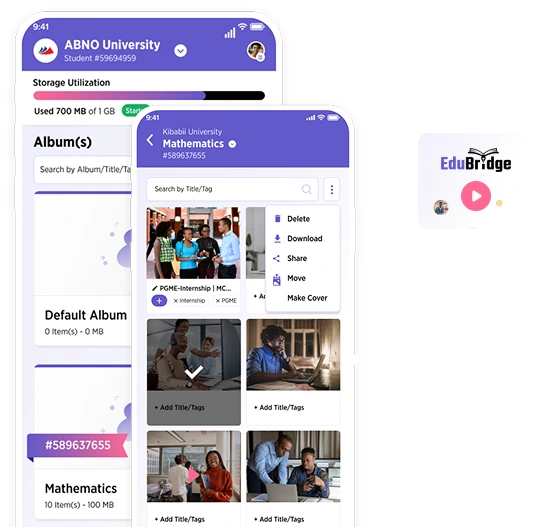
EduBridge gives you a safer way to build your PoE early, organize evidence by unit and keep your work accessible when you need it.
 Manual Box File
 EduBridge

A box file can help you submit papers. EduBridge helps you build an assessment-ready portfolio.
 Free Folder / WhatsApp
EduBridge
Free Folder / WhatsApp
EduBridge
Why Not Just Use Google Drive, Dropbox or WhatsApp?
Free folders can store files, but they do not understand your assessment.
They do not know your registered units, your assessment pathway, your trainer review process or your institution’s PoE readiness needs.
EduBridge is not just storage. It is built around assessment readiness.
Free storage saves files. EduBridge helps you prepare for assessment.
What If Another PoE Platform Is Free or Cheaper?
A free or cheap platform only helps if it supports your real assessment journey.
Your PoE should not just sit somewhere online. It should connect to your registered units, trainer feedback, institution review and the right assessment pathway.
EduBridge is built to support trainees whose PoEs must be visible to the right institution, trainer, assessor and authorized assessment reviewer.
Basic PoE Tool
EduBridge
The cheapest option is not always the safest option when your assessment readiness is at stake.
Today You Can Check Units. Soon You Will Register for Assessment Here Too.

From Registered Units to Ready PoE
in Simple Steps.

Check Your Units
Find your EduBridge profile using your assessment center, admission number and ID / passport / birth certificate number.
Activate Your Profile
Confirm your details, create your login and verify your phone number.
Choose a Plan
Pick the storage plan that fits your PoE.
Upload Your Evidence
Add photos, videos and documents under the correct units.
Get Feedback
Where enabled, trainers and assessors can review your evidence and guide corrections.
Stay Ready
Track your PoE progress and avoid last-minute pressure.
Let’s Talk About Cost Honestly.
Most Trainees Spend
per year on
EduBridge Starts From
per year
EduBridge costs less than printing once for many trainees, and your evidence remains organized after assessment.
Choose the Plan That Fits Your PoE.


Best for trainees with mostly photos and documents.


You can upgrade anytime as your PoE grows.

All payments must be made only through official EduBridge payment channels. Do not give cash, OTPs, passwords or M-Pesa PINs to anyone.

Not Sure Which Plan to Choose?
choose Standard
because it gives enough
space for a complete PoE
with photos, documents and
some videos.
if your course requires many
videos or large project
evidence.
if you only need light
uploads and want to start
affordably.
What You Get for Less Than KES 3 per Day.


Your PoE Follows the Right Assessment Pathway.
EduBridge guides your PoE based on the programme you are registered under.
You do not need to guess where your PoE belongs. EduBridge follows your registered assessment pathway.

Your Work is Safe – Always

even if you change institutions
your data
securely
This Is More Than Exams – It’s Your Career Proof


you can do

you studied

Don’t Wait Until Your PoE Is Rejected



Still Thinking of Waiting?